PROJECT 01 // ACTIVE
AMD FX-8150 // R9 280X // ARCH LINUX
Rebuilding my AMD FX plaform into linux workstation using old and rescued hardware.
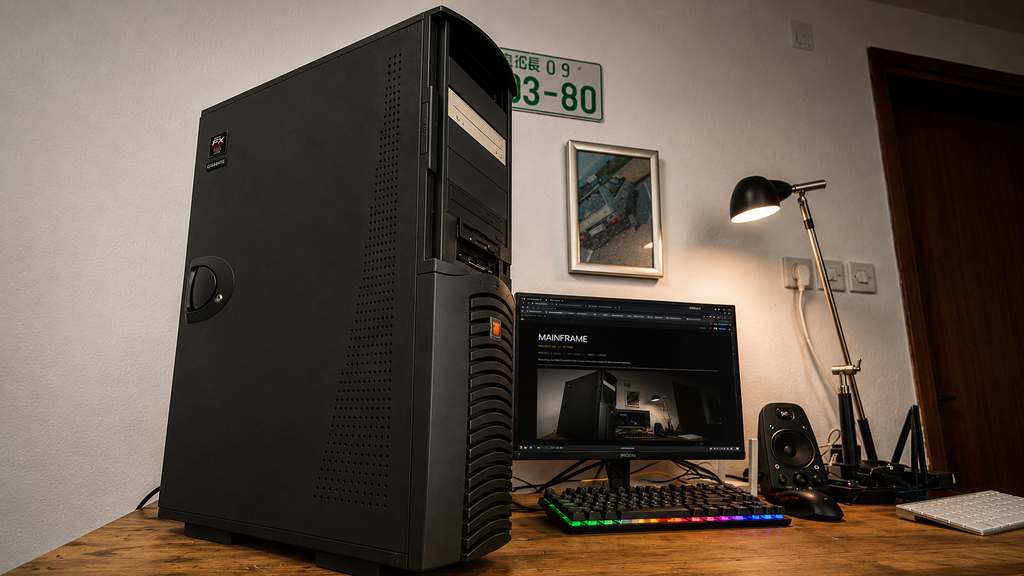
01 // THE BUILD
The Mainframe project started in my head about a year ago, when I decided that I wanted to get back into the world of computers. I wanted to build a home lab, experiment with different hardware and electronic devices, and generally get back to tinkering with technology.
I probably chose the wrong time to start enjoying computers again, considering the current prices of hardware.
Fast-forward about a year, and I ended up building a desktop PC based on AMD’s FX platform, using mostly hardware that I already had. But some of the components in this machine have a much longer history.
Back at the beginning of 2014, I was working as a service technician at a local computer shop. We sold computer hardware, repaired laptops and desktops, fixed networks, built custom PCs, managed the webshop, and generally worked on pretty much anything computer-related.
At the time, Battlefield 4 was extremely popular, and my boss and several of his friends regularly played it together. My own PC was running an AMD Phenom II X4 925, probably 4 GB of RAM, and a GTX 560 that I had actually won in a giveaway from a computer shop that no longer exists.
Unsurprisingly, Battlefield 4 wasn’t exactly happy with that setup.
My boss ended up giving me a motherboard, CPU, RAM, graphics card and power supply so that I could build myself a better computer and join him and his friends in Battlefield 4.
And that hardware would eventually become the foundation of Mainframe.
02 // HARDWARE
Mainframe was built mostly from hardware that my boss gave me back in 2014, along with parts I collected over the years while building and repairing computers for friends, and a few components that I picked up specifically for the project.
You may be wondering why I chose the AMD FX platform when relatively cheap hardware from newer generations, such as AM4 systems with DDR4 memory, is readily available. There were two main reasons: I wanted to reuse the old hardware that had been lying around my house for years, and I wanted to see how cheaply I could build a complete and usable desktop PC. The original purpose of Mainframe was simply to help me start enjoying computers again, but since then it has become the main computer in my home lab.
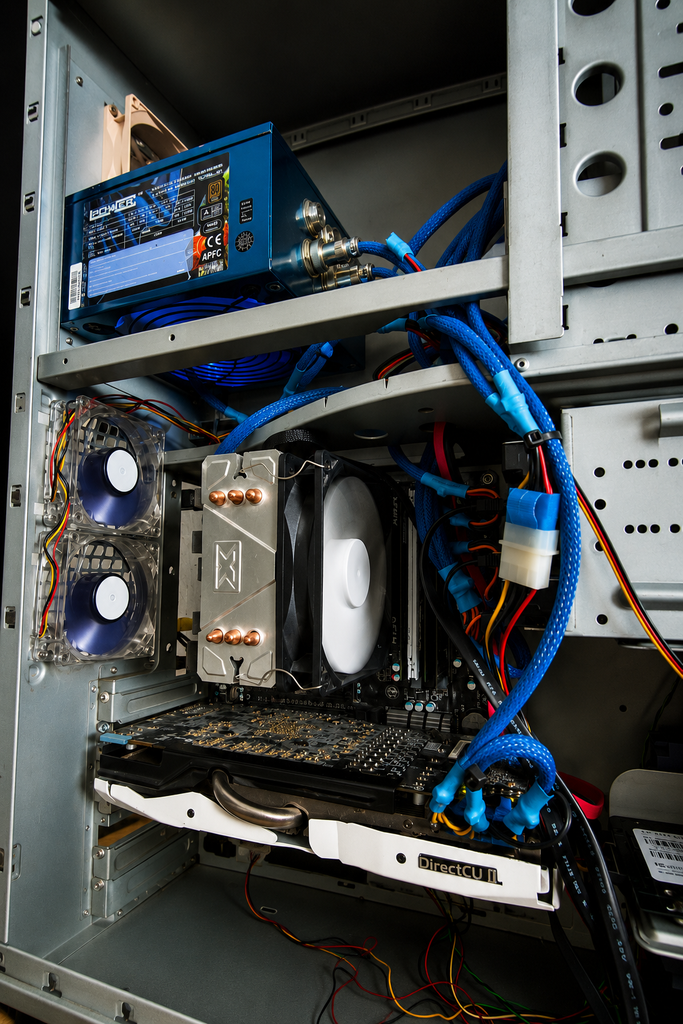
The core hardware currently consists of an AMD FX-8150 cooled by a Xigmatek cooler, a Gigabyte GA-990FXA-UD3 Rev. 4.0 motherboard, an ASUS R9 280X DirectCU II TOP graphics card and 16 GB of DDR3 RAM. It’s very different from a modern desktop PC, but that’s exactly what makes it fun.
THE ORIGINAL HARDWARE
The motherboard, part of the RAM, graphics card, CPU cooler and power supply were all reused from the hardware my boss gave me back in 2014. The original parts included 8 GB of HyperX DDR3 RAM, the Gigabyte GA-990FXA-UD3 motherboard, a 700 W modular LC-Power power supply and the ASUS R9 280X.
The CPU he gave me at the time was an AMD FX-4150, a quad-core processor from the FX family. Back then, I always dreamed of owning one of the FX 8-series processors. Eight cores sounded incredible to me, especially when my own CPU only had four. One of my friends had an FX 8-series processor as well, and for someone interested in PC gaming at the time, having one felt pretty mind-blowing.
I still had the original FX-4150 when I started building Mainframe, but I eventually decided to check local resale websites and Facebook Marketplace to see what I could find. Somehow, I came across a guy selling a bundle containing an FX-8150, 16 GB of RAM, a motherboard and an aftermarket CPU cooler. I called him, and he told me that for €30 he could also throw in a power supply, a case and an HDD.
When we met, we talked for a while and it turned out that he was an awesome guy—you might hear more about him in some of my other projects. He gave me everything he had promised, but things got even better when he handed me the case. It looked almost new, and when I looked inside, I discovered that it was actually an almost complete computer. The only thing missing was the HDD.
That computer is going to become another home lab project. For Mainframe, I ended up using the AMD FX-8150 and an additional 8 GB of RAM from the bundle.
FINDING THE CASE
At this point, I still didn’t have a good case for Mainframe, so I started looking for something suitable. During that search, I found PC Trgovina, a Slovenian shop selling new and used computer hardware. They had a used Chieftec DA-01W-D listed that immediately caught my attention. I had always wanted one of these large Chieftec cases, especially since I had previously modified its smaller brother.
I’m not kidding when I say that I browsed the shop’s website for about two hours before deciding that I had to visit the store and at least buy the case. Of course, I ended up leaving with quite a bit more. Along with the Chieftec, I bought a Xilence 80 mm fan, a used card reader, a used 500 GB HDD and a Mercusys 8-port network switch for my home lab. Everything together cost me €44.
The Chieftec was very dirty when I got it and had a few pieces missing, but nothing that I couldn’t work with. It also came with three 80 mm fans that were so dirty that I had to clean them individually with a brush. After cleaning the case and the existing fans, I added the new Xilence 80 mm fan to improve the airflow.
For storage, I installed an ADATA 240 GB SSD that I already had, along with the 500 GB HDD from PC Trgovina. The SSD became the main system drive for the operating system, applications and a few games, while the HDD provides additional storage.
CURRENT SPECIFICATION
CPU: AMD FX-8150
COOLER: Xigmatek CPU Cooler
MOTHERBOARD: Gigabyte GA-990FXA-UD3 Rev. 4.0
GPU: ASUS R9 280X DirectCU II TOP 3 GB
MEMORY: 16 GB DDR3
SYSTEM DRIVE: ADATA SU650 240 GB SSD
STORAGE: Seagate 500 GB HDD
PSU: LC-Power 700 W Modular
CASE: Chieftec DA-01W-D
OS: Arch Linux
DESKTOP: XFCE
03 // ARCH LINUX
Mainframe currently runs Arch Linux with the XFCE desktop environment. From the beginning, I knew that I wanted this machine to run Linux rather than Windows. One reason is that Windows 11 doesn’t officially support hardware this old. The second reason is much simpler: I don’t really like Windows 11, and I’ve always loved Linux. Those were the main reasons why I decided to use Linux for this project.
I chose Arch Linux because I wanted something that would force me to learn more about how the operating system actually works. I’ve experimented with Linux for years, but most of the distributions I’ve used have been based on Debian. Rather than installing another distribution where most things are already configured for me, I wanted to try something different, building the system step by step and understanding what I was changing along the way.
XFCE was chosen as the desktop environment because it is lightweight, fast and fits the older hardware well. Despite the age of the FX platform, Mainframe has become a perfectly usable Linux desktop for everyday tasks, experimenting, managing my home lab and even playing older games.
Getting modern Linux running properly on hardware from this era wasn’t completely straightforward, especially when it came to the Radeon R9 280X. Some of those problems turned into experiments of their own, so I’ve documented them separately in the Lab Notes.
04 // CURRENT STATUS
Mainframe is no longer used just for fun and the occasional nostalgia trip. It has become a computer that I use daily, heck, I’m even using it right now to build this page about it.
I use Mainframe to manage my home lab network, back up my CD and DVD collection, work on other projects, experiment with Linux and, of course, play some older games. It has gradually become the central machine that I use for many of my home lab activities, which is also how it earned the name Mainframe.
The project is far from finished. I still want to replace the remaining no-name fans with Xilence fans, add more storage and hopefully find the original Chieftec mounting plates so I can make better use of the 5.25-inch drive bays. I’d also like to add front USB 3.0 connectivity, preferably with a built-in SD and microSD card reader.
Like the rest of my home lab, Mainframe will continue to change as I find new hardware, come up with new ideas and discover new things to experiment with.
Check back once in a while to see what’s changed.
PROJECT STATUS: ACTIVE
STARTED: 2025
LAST UPDATED: SEPTEMBER 2026